Windows Support Number

  • Subscribe to our RSS feed.
  • Twitter
  • StumbleUpon
  • Reddit
  • Facebook
  • Digg

Thursday, 30 August 2012

Celebrity Async Deathmatch - round 1

Posted on 13:28 by Unknown
I'm working on an app with lots of asynchronous stream processing done using Rx (Reactive Extensions) - IObservable<T> method. We were discussing the other day whether to replace the implementations which only return a single data item via the Rx stream with the more standard TPL (Task Parallel Library) Task<T> method.

We came to the conclusion we wouldn't make the switch for a couple reasons, firstly keeping the code consistency, we're using Rx everywhere for async so why change; and secondly with a possibly more important reason because performance isn't an issue (at the moment).

Then I thought....

What's the performance difference between IObservable<T> and Task<T> for a single async invocation?

A simple console app should do, running IObservable<T> vs Task<T> and the quickest wins - reminds me of Celebrity Deathmatch...

Firstly we need something to test, calculating the first 100 primes:
All I need now is a couple of methods for each async implementation...

firstly IObservable<T>:
secondly Task<T>:
All I need now is a test program:

So which test method is quicker?

The answer is Task<T>, in facts it quicker by a factor of greater than 10:
Even if I swap the order Task<T> out performs:


Read More
Posted in Async, C#, Development, Rx, Task | No comments

Monday, 27 August 2012

Using PostSharp for AOP with Reactive Extensions

Posted on 13:09 by Unknown
I'm currently working on a project with @HamishDotNet & @LordHanson where we make heavy use of Rx (Reactive Extensions) for processing streams of data which are generated asynchronously. We have multiple pipeline processes based around an Rx stream, they look something like this:
The method Sequence returns an instance of IObservable<T> which is then acted upon by 4 or 5 methods before the Subscriber is called, some of these methods might mutate the state along the way. The important part is the idea of the pipeline to process the Rx stream as it is generated by the asynchronous Sequence method.

So what I wanted to do is log what's going on - how long each step takes (in the pipeline) as well as how long the Rx stream is alive and when the stream generates a value. The issue we have is we don't want to overly modify the code just support such logging\telemetry. I don't want to end up with something like this:
Don't get me wrong, if I had only a couple of Rx calls in the whole app then I'd probably go with the quick option above, but we have a lot of Rx calls.

What I want is an AOP approach - the lightest touch possible. I chose to use PostSharp for the AOP, the simple reason being it's the one I've heard most about.

The first step was to create a simple console app and add references for Rx & PostSharp via NuGet - couldn't be simpler:
Next I needed a couple of Rx methods to test with, I created two, one generating a continual sequence of numbers with an interval of 500 ms and one generating a single number after an initial delay of 1000 ms, it then completes the Rx stream:
The two methods are rather contrived but this is a demo after all. This is used in the following console app.

What you can see is the main thread is blocked by the call to the Console.ReadLine method inside the Using statement, but because of the asynchronous nature of Rx the application will coninute to work on a background thread. This background thread will call back to the Subscriber set up to call the Display static method every time data is published onto the Rx stream:
As you can see from above I'm using the Sequence method initialised with 42, this produces the following output ad-infinitum until the enter key is pressed:
Once enter is pressed our subscription to the Rx stream is automatically disposed by the Using statement:
I've now got the example code working so the next step is to add some telemetry\logging to the method. The first approach is to add a basic PostSharp attribute to the methods. After a quick google for an example I came up with the following, it simply writes to the console when the method is entered and exited:
This is then applied to the Sequence method on the Generator class as an attribute:
You can probably guess what's produced if you're familiar with the Rx style of coding - because the method is asynchronous the OnEntry & OnExit methods of the attribute are called immediately before anything is published to the Rx stream - Ithe telemtry is output as green text in the console output:

So How can I get telemetry to output when ever something is published to the Rx Stream?

Now this is where the knowledge of Rx comes into play - anyone who's used Rx for sometime will understand about the interface IObservable<T> & IObserver<T> In this case I'm particularly interested in the IObservable<T>, it exposes the subscribe method which allow a user to subscribe to the Rx stream:

I know PostSharp provides access to the return parameter for a method and since my Sequence method returns an IObservable<Int> I should be able to subscribe to the Rx stream and then output telemetry via the console:
Now the easiest solution is to cast the return value into an IObservable<Int> and then subscribe to the Rx stream:
This produces the required output; but there is a big problem with the implementation - it's not a generic solution, it only works for IObservable<Int>
To produce a truly generic solution that works with any implementation of IObservable<T> I need to use reflection to subscribe to the OnNext method of the return value passed to the OnExit method:
What you see above is the reflection code need to successfully execute the Subscribe method on the IObservable<T>.
I've introduced an instance of the Stopwatch class to capture timing information and importantly introduced a custom class, TraceObservable<T>, this class actually writes out the telemetry information to the console. The instance of this class ('traceInstance') is passed to the Invoke method of the MethodInfo class for the Subscribe method on the IObservable<T> of the return value:
What you'll also see above is I've added an implementation for the OnCompleted method - this will required another PostSharp Aspect to be defined but for now this is the output this produces - again the telemetry info can seen as green text in the console window:
Now I'm pretty much there, the only difference now for the test program is the addition of a couple of attributes to the Generator class:
An interesting side effect of the test program is when we dispose of our Rx subscription the PostSharp aspect continues to output telemetry information - this is actually completely logical and will only stop once the instance of the Generator class is destroyed:
To see how the OnCompleted method is called for the TraceObservable<T> we need another PostSharp aspect as stated previously:
This is then like the other PostSharp aspects as method attributes on the Generator class:
This produces the following output when the Single method on the Generator class is used in the test program:

That pretty much covers it...

I've been able to add the telemetry I want without actually changing the method implementation, I've only had to add a couple of method attributes

And I also tried this in Silverlight - it works for version 4 and beyond....

The code is available for download.

Read More
Posted in .Net, AOP, Development, PostSharp, Reactive Extensions, Rx | No comments

Sunday, 22 July 2012

Category & sub-category combo boxes

Posted on 12:56 by Unknown
I was asked the other week how I'd implement a view-model that binds to two combo boxes in the view, where a selection in one affects the other. I've called it category & sub-category combo boxes but I guess it could also be called parent-child combo boxes.

Now I don't perceive this as particularly complex to do, but I was asked how would I do it?

Would I use two seperate lists and how would I avoid stack overflow exceptions when raising property changed events.

The UI looks like this:
The categories are represented by the top combo box:
The sub categories are represented by the bottom combo box:
You should be able to infer from the screen shots that each category has a set of sub-categories, the only special category is All - when selected then all sub categories are displayed, as shown above.

So when Category A is selected then only the related sub-categories should be displayed:
I used a dictionary &  linq to achieve the behaviour required, I avoided using two separate lists. The constructor & class parameters are shown below. As you can see there are only 2 parameters - one for the selected category and the other for the selected sub-category:
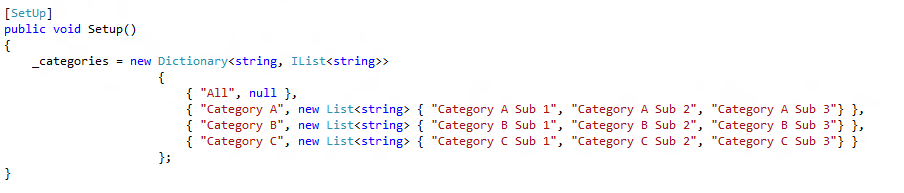
The example data pumped into the view-model looks as follows:
I've host the code on sky-drive but I've highlighted the properties on the view-model below starting with the simplest the Categories property. As you can see this is very simple:
It starts to get interesting with the SelectedCategory property, when the property is being set it clears the selected sub-category if the currently selected sub-category is not part of the selected category and then always notifies the of changes to the SubCategories & SelectedSubCategory properties:
The SubCategories property is either a linq if the selected category is either All or empty\null, or just the value from the dictionary:
The final property is SelectedSubCategory, simply if the selected category is All then do nothing else if the selected category does not contain the selected sub-category then find the one that does:

Read More
Posted in C#, Development, MVVM | No comments

Sunday, 8 July 2012

CallerMemberName not that great for INotifyPropertyChanged

Posted on 06:47 by Unknown
I've blogged before about the perf improvements of using the CallerMemberName attribute over an expression tree to avoid using hard-coded property strings names when firing the PropertyChanged event on INotifyPropertyChanged.

This works great for the majority simple cases.

Setting the property & notifying:
 or just notifying:
The problem is when it's not the simple case - when setting a property on a view model and wanting to force the updating of another property (on the view model) it doesn't work obviously.
At this point I'm thinking I'll go back to the expression tree approach.
Read More
Posted in C#, Development, MVVM | No comments

Tuesday, 3 July 2012

No GetEntryAssembly in Silverlight!

Posted on 13:43 by Unknown
Ran into a problem today, wanting to get the assembly that started the an application. Now this isn't a tricky problem just had to bend it to my will :)

We have a code-base shared across platforms (WPF & Silverlight) via project linker and we need the ability to get the executable assembly, MSDN describes this as 'the assembly that is the process executable in the default application domain' ans this is accessed via the GetEntryAssembly method.

The problem is purely because GetEntryAssembly is not supported in Silverlight so we had to come up with away to get the assembly version of the startup dll in the Silverlight XAP.

The following code is contained in a library (framework) assembly which know nothing about which assembly (executable) was loaded into the default application domain.

So I came up with the idea of using the Application.Current property:

Read More
Posted in C#, Development, Silverlight, WPF | No comments

Being featured in windows phone marketplace

Posted on 12:52 by Unknown

I was looking at the download figures for FINDaPAD in the windows phone marketplace today and noticed another spike in downloads on the 26th of June, it had the same pattern as the spike on the 20th of May.

Why are we getting such high downloads on these days?
Normally we get a much more modest download rate, 150 per month - not bad a for free app only targeting the UK marketplace:

The only reason I can think of is - we've been featured twice in the windows phone marketplace. It would kind of make sense as the second peak is considerably smaller than the first indicating a subsequent placement in the marketplace.

It would have been nice to get some heads-up before being featured, even if it's only for personal vanity :)

So if you want to get your app featured in the marketplace make sure you complete all the artwork requirements. These can be updated at any time:


Read More
Posted in Development, marketplace, windows phone, WP7 | No comments

Sunday, 24 June 2012

I no longer build C# apps

Posted on 08:07 by Unknown
Okay so the title is slightly misleading, I'm still writing code in C# (.Net) but I'm no longer manually building the solution inside Visual Studio, no F5, no Ctrl+Shift+B...

You might be thinking huh?

What I mean is I no longer go round the continual cycle of write code, compile code, test code, refactor code etc. We've managed to remove the compile & test phases from the development process and I can't elaborate how liberating this is.

This has been achieved by using a continuous testing framework - tests are executed as you write the code. I found this article back from 2007 stating all the benefits you'll get from using such a framework - 'It’s turning the knob on Test Driven Development up to 11' - so true...

I'm currently working in an environment where the main constraint is not the tools we're using but the underlying OS. We're stuck with 32 bit Win XP machines for at least the short to medium term and our biggest problem is Out of Memory exceptions when compiling the code-base. This is 'by design' apparently, I understand why this is happening but it's still damn annoying and we wanted a way to reduce it. This is where I've found a continuous testing framework and an external triggered build process has really helped to reduce the number of OOM exceptions. Put simple the number of full builds has been reduced and therefore the number of OOM exceptions has also been reduced...

So which continuous testing framework are you using?

nCrunch developed by Remco Mulder, it's currently free whilst in beta.

The only other product I know about right now is Mighty Moose (by Greg Young of DDD fame). Previous to nCrunch I would have used DotCover to runs tests manually, but this has now been un-installed - I did hear on the grape vine that JetBrains are planning to have something out in the new year, hopefully dotCover will be upgraded. nCrunch doesn't currently support Silverlight which isn't a problem as we're using Project Linker to target the code base for both WPF & Silverlight platforms - nCrunch is automatically covering all the tests in the WPF (desktop).

nCrunch has everything I need, using the code from my previous post about Rx and the RefCount operator, these are the features and windows I'm currently using:

Syntax highlighting - you can see from the following screenshot the code is annotated with coloured icons on the left hand side:
Green indicates codes under test:
Black indicates code not under test:
The above black indicator shows there aren't any tests that are subscribing to the Listen method and receiving updates.

Red indicates code that failed as part of a one or more tests:
Tests are also annotated with icons on the left, but this time the failing line is highlighted with a red 'x':, hovering over the icon gives details of why the test failed - As you can see nCrunch has support for MSpec as well:
Test Window - Gives fast up-to-date info on failing tests:
It can also show passing tests:
Metrics Window - Allowing me to see where coverage is missing - a higher level view of the info provided whena file is open in Visual Studio:
Risk/Progress Window - not quite sure yet of the full benefit, but it does give a nice big binary (red\green) status of all the tests:
As I said at the start I'm no longer building the code manually this happens all automatically, the only time I ever hit F5 how is to run up the app to investigate a particular test problem...

A big shout out to @HamishDotNet for introducing us to nCrunch and also to @LordHanson for sorting out the external build process...
Read More
Posted in C#, continuous testing, Development, nCrunch | No comments
Newer Posts Older Posts Home
Subscribe to: Posts (Atom)

Popular Posts

  • MVVM anti-pattern: View code behind with no implementation
    I've seen rather a lot of this anti-pattern recently, to be explicit about what I mean, lets define this in terms of a WPF user control....
  • WP7Contrib: Bing Maps REST Services Wrapper - Deep Dive
    Following on from Rich's post introducing the Bing Maps Service in the WP7Contrib I'm going to explain in more detail how we built ...
  • Using IoC nested lifetime scopes with View Models in MVVM
    A common pattern you see when developing web services is the use of the Unit of Work applied to the HTTP request - anything that happens dur...
  • Be careful of the culture when using Bing Maps REST API
    When developing the Bing Maps Wrapper service for the WP7Contrib we weren't aware of the importance of the instance of the CultureInfo ...
  • Implementing a message box using a visual overlay in MVVM
    I've blogged about implementing a busy indicator before, this post is an extension of this pattern to implement a message box - this is...
  • Azure - RoleEnvironmentException in OnStart
    My previous post was a bit of rant at the developer experience in Azure when trying to set-up diagnostics. I managed to work out what was c...
  • WP7Contrib: Transient caching with In Memory Cache Provider
    Rich  and I are currently working on a WP7 application based around local content stored on the device.   This content consists of a databas...
  • Manipulating web browser scroll position on Windows Phone 7
    Manipulating the browser control position on WP7 is relatively straight forward, all you need to is a couple of calls out to javascript usin...
  • MVVM anti-pattern: Injecting the IoC container into a View Model
    This is another anti-pattern I've seen a lot recently, the dynamic use of the IoC container inside a view model to resolve child view mo...
  • Coupling and cohesion
    I was reading ploeh's blog  this morning and it made me think about coupling and cohesion in general. These are import concepts in softw...

Categories

  • .Net
  • .Net 4.5
  • Abstractions
  • Advertising
  • Agile
  • Agile Courage
  • AOP
  • Async
  • automated testing
  • Azure
  • Azure IIS RESTful development
  • BDD
  • Bing Maps
  • Bounded Context
  • C#
  • C# 5.0
  • Caching
  • Chocolatey
  • CLoud
  • CodePlex
  • Coding
  • Coding Building CI Testing
  • Coding C#
  • coding C# IoC StructureMap
  • Coding Functional-Programming
  • Coding REST Knowledge
  • Coding Services
  • Coding TDD Refactoring Agile
  • Command
  • continuous testing
  • coupling
  • CultureInfo
  • DAL
  • databases
  • DDD
  • DDD Coaching
  • DDD Domain Events Auditing nHibernate
  • DDD Entities Value Objects
  • Debugging
  • Design Patterns
  • Design Patterns Databases Auditing
  • Developement
  • Development
  • Development Coding
  • Development Process
  • Development unit testing
  • Development VS 2011
  • Diagnostics
  • Disposable
  • Exceptions
  • FINDaPAD
  • FindaPad Property Rental Windows Phone 7 Mobile Devices
  • Fun Coding Duct-Tape
  • Hotfixes
  • integration testing
  • IoC
  • jasmine
  • javascript
  • Jobs Development
  • LINQ
  • marketplace
  • Mobile Devices
  • Mocking
  • MSDN Coding
  • MSpec
  • Multilingual
  • MVC
  • MVVM
  • nCrunch
  • nHbiernate Repository Pattern Criteria
  • nHibernate Auditing Design Fluent
  • nHibnerate Entities Events Listeners
  • node.js
  • nodes.js
  • Nokia
  • NoSQL RavenDB Azure Development
  • Observations
  • OO
  • ORM
  • Performance
  • Portable Class Library
  • Portable Library
  • PostSharp
  • Process
  • Rants
  • RavenDB IIS 7.5 Development
  • Reactive
  • Reactive Extension
  • Reactive Extensions
  • ReadOnlyCollections
  • Resharper
  • REST Distributed-Systems
  • REST HTTP
  • rest web
  • RESTful
  • Rx
  • Serialization
  • Silverlight
  • Silverlight Installation
  • Task
  • TDD
  • TDD IoC DI
  • TDD Mocking
  • TDD Team Observation
  • Telerik
  • testing
  • threading
  • TPL
  • UI
  • Undo-Redo
  • unit testing
  • ViewModels
  • VS 2012
  • wcf
  • web api
  • Web Services
  • web services mobile devices data
  • WebAPI
  • Windows
  • Windows 8
  • windows phone
  • Windows Phone 7
  • WP7
  • WP7 Bing Maps Development Network HTTP
  • WP7 Bing Maps Development UK Crime
  • WP7 Bing Maps Development UK Crime Clustering
  • WP7 Bing Maps Development UK Polygons Clustering Performance
  • WP7 cryptography bouncy castle
  • WP7 Cultures C#
  • WP7 feedback development app store
  • WP7 Javascript web browser
  • WP7 MSBuild
  • WP7 ORM Databases performance
  • WP7 Serialisation
  • WP7 SilverlightSerializer C#
  • WP7 sqlite performance development
  • WP7 WP7Contrib Bing Maps Development
  • WP7 WP7Contrib Bing Maps Polygon Development
  • WP7 WP7Contrib CodePlex
  • WP7 WP7Contrib CodePlex Bing Maps Development
  • WP7 WP7Contrib CodePlex ObservableCollection
  • WP7 WP7Contrib ILMerge .Net
  • WP7 WP7Contrib Phone Maps
  • WP7 WP7Contrib SilverlightSerializer C#
  • WP7Contrib
  • WP7Contrib Bing Maps WP7
  • WP7Contrib WP7 Geo-Location development C#
  • WP7Contrib WP7 HTTP Compression
  • WP7Contrib WP7 Url Development Rx
  • WP7Dev
  • WPF
  • WPF Cultures
  • WuApi
  • XAML

Blog Archive

  • ▼  2013 (16)
    • ▼  November (5)
      • MVVM anti-pattern: Injecting the IoC container int...
      • MVVM anti-pattern: View code behind with no implem...
      • MVVM anti-pattern: explicitly using data context i...
      • Implementing a message box using a visual overlay ...
      • Using IoC nested lifetime scopes with View Models ...
    • ►  September (3)
    • ►  August (1)
    • ►  July (1)
    • ►  June (3)
    • ►  May (2)
    • ►  January (1)
  • ►  2012 (44)
    • ►  November (2)
    • ►  October (8)
    • ►  September (5)
    • ►  August (2)
    • ►  July (4)
    • ►  June (3)
    • ►  May (1)
    • ►  April (2)
    • ►  March (13)
    • ►  February (4)
  • ►  2011 (52)
    • ►  December (3)
    • ►  November (5)
    • ►  October (7)
    • ►  September (7)
    • ►  August (11)
    • ►  July (4)
    • ►  May (2)
    • ►  April (1)
    • ►  March (5)
    • ►  February (3)
    • ►  January (4)
  • ►  2010 (1)
    • ►  August (1)
  • ►  2009 (32)
    • ►  December (3)
    • ►  November (7)
    • ►  October (6)
    • ►  September (11)
    • ►  April (1)
    • ►  March (4)
Powered by Blogger.

About Me

Unknown
View my complete profile